If you searched HP Smartchoice OmniBook 5, you’ve probably noticed something confusing: different processors, different screen sizes, some models say “Previously Pavilion”, and prices change every week depending on offers. That’s exactly why many people end up buying the wrong variant.
This guide is written for India buyers who want a clear, practical answer: what “Smartchoice” means, what OmniBook 5 is, which variant fits your use, what to verify before ordering, and what a fair deal looks like right now.
HP Smartchoice OmniBook 5: What does this name mean in India?
Let’s break it down simply.
“OmniBook 5” is the laptop series. In India, many listings also show “Previously Pavilion”, which indicates HP is positioning OmniBook as the newer naming for what many buyers used to consider in the Pavilion range. You’ll see this “Previously Pavilion” wording directly on major retailer listings.
“Smartchoice” is usually a marketplace label, not a different HP product line. On Amazon India, “Smart Choice” was introduced as a store/curation concept meant to simplify laptop buying, and some listings add “Smartchoice” in the title. Mint also describes Smartchoice laptops on Amazon as selected based on buyer feedback, reliability, and real-world use cases. So don’t assume “Smartchoice” automatically means “best specs”—always judge the laptop by its exact model code and configuration.
The biggest takeaway: HP Smartchoice OmniBook 5 is not one single laptop. It’s a family of variants.
The fastest way to choose the right HP Smartchoice OmniBook 5
Before specs, decide your main use:
If you want a laptop mainly for MS Office, classes, Zoom/Meet, browsing, and light editing, you’ll be happy with the value-focused OmniBook 5 variants (including Intel 13th Gen i5 models and AMD Ryzen AI 5 models).
If you want better AI-ready performance and smoother multitasking, look at Ryzen AI 5 / Ryzen AI 7 models that highlight NPU/TOPS and “Copilot+” style positioning on listings.
If your priority is battery life and portability, some OmniBook 5 configurations also come with Snapdragon-based “AI PC / Next Gen AI PC” positioning (this matters because app compatibility can differ—more on that later).
Variants you’ll see online (and what each is good for)
1) AMD Ryzen AI models (popular “Smartchoice” listings)
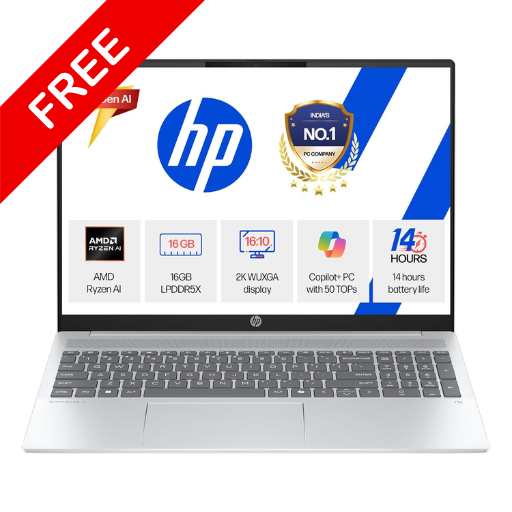
Many India listings for HP Smartchoice OmniBook 5 highlight AMD Ryzen AI processors with 16GB RAM and 512GB SSD and often a 16-inch 16:10 display. For example, Reliance Digital lists an OmniBook 5 variant with AMD Ryzen AI 5 340, 16GB RAM, 512GB SSD, and 1920×1200 resolution on a 16-inch display.
These AMD Ryzen AI variants usually make sense if you want:
Practical day-to-day speed, smoother multitasking, and a more “future-ready” feel for Windows features that use an NPU.
One important detail: RAM on many thin laptops is onboard LPDDR (meaning you typically can’t upgrade later). Some sellers explicitly mention LPDDR5x onboard for OmniBook 5 variants, so treat RAM choice as a “buy once, keep it” decision.
2) Intel mainstream variants (good value when discounted)
You’ll also see OmniBook 5 listings with Intel processors that are positioned as thin-and-light laptops. For example, Flipkart lists an OmniBook 5 “Previously Pavilion” model with Intel Core i5 13th Gen 1334U, 16GB RAM, and 512GB SSD.
These are usually best if you want:
Solid everyday performance, predictable Windows compatibility, and a better chance of getting aggressive discounts during sales.
3) Snapdragon “AI PC / Next Gen AI PC” variants (battery-first approach)
HP’s OmniBook 5 marketing in India talks about OmniBook 5 “AI PC” positioning and mentions features like optional HP AI Companion and “up to 34 hours” battery life for select configurations.
Independent reviews for the 14-inch OmniBook 5 (2025) highlight very strong battery life in testing (the review discusses over-16-hour results), but remember: battery depends heavily on the exact chip, display, brightness, and your usage.
If you are considering Snapdragon variants, do one extra check: your must-have apps. Most common apps are fine, but some specialised tools, old drivers, or niche software can behave differently on Windows-on-ARM. If your work depends on a specific app, verify it before buying.
Display: what matters more than “2K”
Listings often use terms like “2K”, “WUXGA”, “IPS”, “OLED”, and “touch”. Here’s what to check in simple terms:
If the listing shows 1920×1200 on a 16:10 screen, that’s a good productivity-friendly resolution (more vertical space than normal 1080p). Reliance Digital lists 1920×1200 for a 16-inch OmniBook 5 variant.
If you see OLED mentioned, you can expect deeper contrast and punchier colours, but it may cost more. HP’s OmniBook 5 marketing mentions up to a 16-inch 2K OLED option on select models.
If you see touchscreen, decide based on your use: it’s great for scrolling, casual use, and presentations, but it can add cost and sometimes a bit of weight.
The OmniBook 5 and “AI”: what is actually useful?
A lot of product pages throw around AI terms. The practical, everyday value usually comes from things like:
better video call features (noise reduction, background effects), faster photo tasks in supported apps, and smoother “smart” Windows features.
HP also promotes HP AI Companion as an optional feature for local AI tasks and secure file analysis on-device. Whether it matters to you depends on if you’ll actually use built-in AI tools, or you mostly live in Chrome and Office.
Also, don’t buy only for the AI label. Buy for the basics first: screen, keyboard comfort, RAM, thermals, warranty, and the ports you need.
Battery and charging: what you should expect in real life
Two useful points from HP’s OmniBook 5 marketing:
HP mentions fast charge up to 50% in 30 minutes (on supported models/conditions).
HP also mentions up to 34 hours of local video playback for a specific select configuration (the footnote describes a Snapdragon X1-26-100 setup and specific conditions like brightness and content type). Treat this as a best-case scenario, not what you’ll get in mixed daily use.
If you want an honest expectation: for most people, “all-day battery” is possible on the right configuration, but your display brightness, video calls, and heavy multitasking can reduce it significantly.
Price in India: what’s “good value” right now?
Prices move fast during sales, so instead of giving one “final” number, here’s how to judge value using real listings:
Flipkart shows an OmniBook 5 Intel i5 13th Gen (16GB/512GB) around ₹63,990 at the time shown on the page.
Amazon shows a The OmniBook 5 listing with AMD Ryzen AI 7 350, 16GB LPDDR5X, 512GB SSD, and a 16-inch touch display, with a displayed price around ₹80,990 on that page snapshot (offers/coupons can change the effective price).
Some India sellers list an AMD Ryzen AI 5 340 (16GB/512GB) OmniBook 5 around the high-60k range.
A simple rule: if you are in the ₹60k–₹75k band, aim for 16GB RAM + 512GB SSD with a good display. If you’re paying closer to ₹80k+, make sure you’re getting a clear upgrade (better chip, better screen like touch/OLED, better battery-class model, or extras that matter to you).
Buying checklist: don’t order an HP Smartchoice OmniBook 5 before you verify these
Model number is more important than the title
Marketplace titles can be long and messy. Always locate the exact model/series line and core specs (processor, RAM, SSD, display resolution). Retailers like Reliance Digital show model details clearly for some variants.
RAM: assume you can’t upgrade later
If the configuration mentions LPDDR (especially onboard LPDDR5/LPDDR5x), treat it as non-upgradable and buy the right amount from day one.
Ports: check HDMI and Bluetooth version if you need them
If you regularly connect to a TV/projector, confirm HDMI type in the spec list. Reliance Digital lists HDMI 2.1 and Bluetooth v5.4 for an OmniBook 5 variant.
Display type: IPS vs OLED, touch vs non-touch
If you watch a lot of content or do colour-sensitive work, OLED can be worth paying more. If you mostly do documents and browsing, a good IPS panel is usually enough. HP itself highlights OLED options on select models.
Final verdict: who should buy HP Smartchoice OmniBook 5 in India?
Buy the OmniBook 5 if you want a modern, thin-and-light 16-inch or 14-inch laptop for study, office work, meetings, and everyday productivity—and you’re willing to choose carefully among variants.
It’s not meant to be a gaming-first laptop. It’s a practical, premium-feeling daily machine where your experience will depend heavily on the exact model (AMD Ryzen AI vs Intel vs Snapdragon) and the display configuration.
FAQs
Is HP Smartchoice OmniBook 5 different from HP OmniBook 5?
Usually, “Smartchoice” is a marketplace label used in listings, while “OmniBook 5” is the actual laptop series. Always confirm by checking the processor, RAM, storage, and model number rather than trusting the title alone.
Why does HP Smartchoice OmniBook 5 say “Previously Pavilion”?
Many listings show “Previously Pavilion” to communicate the new branding and positioning. It helps buyers connect the OmniBook naming with the older Pavilion familiarity.
Is HP Smartchoice OmniBook 5 good for students in India?
Yes, if you pick a variant with 16GB RAM and 512GB SSD, it’s well-suited for classes, assignments, browsing, and online meetings. Just make sure you choose the right processor for your needs and don’t buy a low-RAM model expecting upgrades later.
Does HP Smartchoice OmniBook 5 really give 34 hours battery?
HP mentions up to 34 hours for a specific select configuration under specific test conditions (like local video playback settings). Real-world battery will usually be lower and depends on brightness, apps, and your daily workload.
Which HP Smartchoice OmniBook 5 variant is safest for app compatibility?
Intel and AMD Ryzen variants are the most straightforward for Windows app compatibility. Snapdragon variants can be excellent for battery and portability, but if you rely on niche software, verify compatibility before purchasing.