Let’s be brutally honest. If you’ve walked into a Croma or Reliance Digital in the last few years, and asked about those “cheap laptops,” the salesperson probably gave you a skeptical look and said, “Arre sir, that’s just a Chromebook. It only runs a browser. You can’t do real work on it.”
For a long time, especially in the Indian market where we value “paisa vasool” (value for money) and maximum compatibility, they were half-right.
But in 2024, that statement is outdated trash.
I’ve spent the last 15 years reviewing everything from ₹3 Lakh gaming rigs to entry-level Maruti hatchbacks. My job is to tell you when technology actually solves a problem versus when it’s just marketing fluff.
Here is the real truth: For 80% of Indian users—students, office goers, writers, and home users—a Chromebook is actually faster, more secure, and far better value than a budget Windows laptop that starts lagging six months after you buy it.
If your life revolves around Chrome tabs, Google Workspace (Docs, Sheets), Zoom calls, and Netflix, a Chromebook isn’t just an alternative; it’s often the superior choice. Let’s break down why, and when you should absolutely avoid it.

QUICK SPECS: The Chromebook Buyer’s Matrix (India Context)
Since “Chromebook” is a category, not a single device, we can’t do a standard specs table. Instead, here is the matrix of what you should expect at different price points in the current Indian market. This is crucial so you don’t overpay.
Table: Chromebook Tiers in India (2024-25)
| Feature | The Budget Student (₹15k – ₹25k) | The Mid-Range All-Rounder (₹25k – ₹40k) | The Premium Power User (₹40k – ₹70k+) |
| Processor | Intel Celeron N4500 / MediaTek Kompanio | Intel Core i3 (12th/13th Gen) / Ryzen 3 | Intel Core i5 / i7 (13th Gen +) |
| RAM (Crucial) | 4GB LPDDR4X (Bare Minimum) | 8GB LPDDR4X/5 (Recommended Standard) | 8GB – 16GB LPDDR5 |
| Storage | 64GB eMMC (Slow) | 128GB / 256GB SSD (Fast) | 256GB – 512GB NVMe SSD (Super Fast) |
| Display | 11.6″ – 14″ HD (Often dull TN panel) | 14″ – 15.6″ FHD IPS Touchscreen (Sharp) | FHD+ to 4K, High Brightness Touchscreen |
| Build | Plastic chassis, thick bezels | Aluminium lid/chassis, Convertible 2-in-1 | Full Aluminium CNC, Premium finish |
| Best For | School kids, very basic browsing | College students, WFH professionals | Developers (Linux), Power executives |
DESIGN & BUILD: Moving Beyond “Cheap Plastic”
Five years ago, a ₹20,000 Chromebook felt like a child’s toy—creaky plastic, awful hinges, and keyboards that flexed when you typed.
Today, the landscape has shifted. While the entry-level sub-₹20k segment is still mostly plastic (which is fine for durability in school bags), the ₹30,000+ segment has seen a massive upgrade in fit and finish.
Companies like HP (with their x360 range), ASUS (Flip series), and Lenovo (Duet and Flex series) are bringing premium materials down the price ladder.
The Rise of the 2-in-1 Convertible:
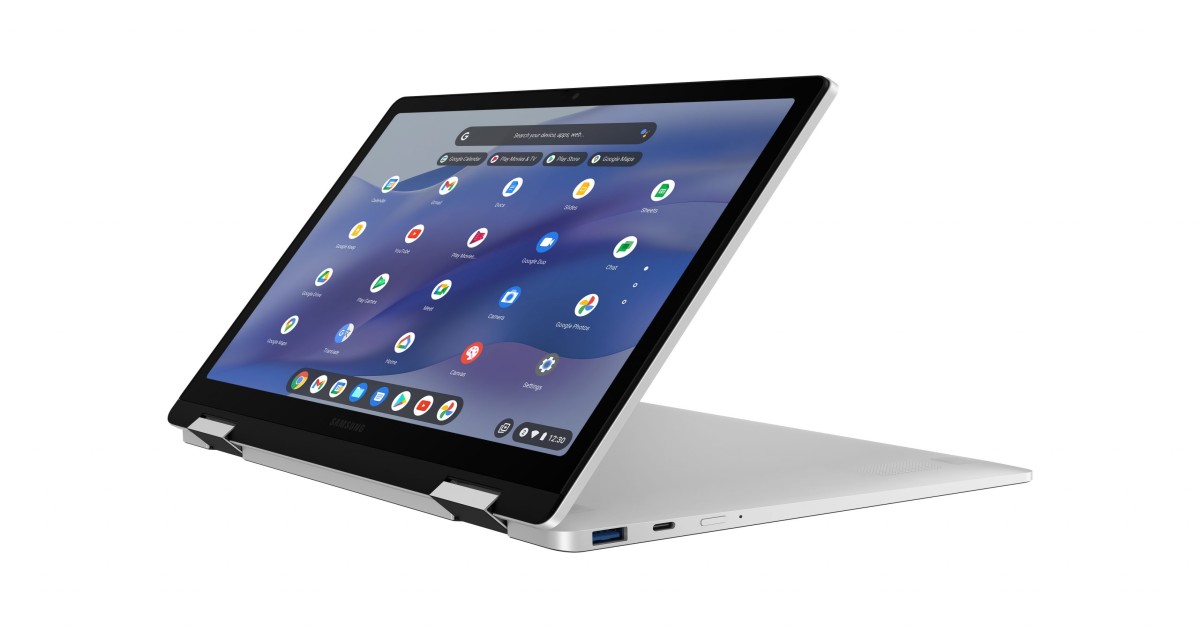
This is where Chromebooks shine in India. A 360-degree hinge allows you to flip the keyboard back and use the device as a tablet. Why does this matter? Because modern Chromebooks run Android Apps. Using apps like Hotstar, Kindle, or even light gaming on a laptop form factor feels awkward. Flipping it into “tent mode” or “tablet mode” makes it a fantastic media consumption device.
- In-hand Feel: A decent mid-range Chromebook today weighs around 1.4kg to 1.6kg. They feel dense and well-constructed.
- The Keyboard Test: Look for backlit keyboards (essential for late-night work) and decent key travel. Most mid-range options now offer typing experiences that rival Windows laptops costing ₹15,000 more.

DISPLAY & VISUALS: The IPS Imperative
This is the single biggest area where budget buyers get burned.
The “TN” Trap: Many sub-₹25,000 Chromebooks use “TN” (Twisted Nematic) panels. These look washed out, have terrible viewing angles (if you tilt the screen slightly, the colors invert), and are generally unpleasant to use for long periods.
The “IPS” Requirement: In 2024, do not buy a laptop without an “IPS” (In-Plane Switching) panel. IPS offers vibrant colors and wide viewing angles. It is non-negotiable for watching Netflix or editing photos.
Brightness (Nits) Matters in India:
We have bright sunlight. A screen with 220 nits of brightness is useless near a window.
- Target: Aim for a minimum of 250 nits, ideally 300 nits if you plan to work outdoors or in bright cafes.
Touchscreen is Essential: Because of Android app integration, using a Chromebook without a touchscreen feels incomplete. It’s worth the extra few thousand rupees.
Read More: POCO C85 5G

PERFORMANCE & THE “ENGINE” (Chrome OS)
This is where the magic happens, and where the biggest misunderstandings lie.
The Lightweight Advantage:
Think of Windows 11 like a heavy SUV. It can carry a lot of cargo (heavy legacy software), but it needs a big engine and lots of fuel to get moving. If you put a small engine in it (budget processor), it feels sluggish.
Chrome OS is like a lightweight sports bike. It doesn’t need a massive engine to feel incredibly fast. It boots up in under 10 seconds. It wakes from sleep instantly—just like your phone.
The Real-World Usage Test:
On a mid-range Chromebook (Core i3, 8GB RAM):
- Browsing: I routinely have 25+ tabs open in Chrome, including heavy sites like Google Sheets, YouTube playing in 4K, and complex web apps. There is zero stutter. Try doing that on a ₹35,000 Windows laptop with 8GB RAM, and it will start gasping for air.
- Android Apps: The Google Play Store is built-in. You can install Microsoft Office (the Android versions), Adobe Lightroom Mobile, Spotify, and millions of games. They run natively. However, be warned: not all Android apps are optimized for big horizontal screens.
- Linux (For the Geeks): With one click in settings, you can enable a Linux terminal. This allows developers to install full-desktop grade applications like VS Code, GIMP, and more. This turns a Chromebook into a serious development machine.
The “Offline” Myth:
Another lie told by salespeople: “It becomes a paperweight without the internet.”
False. Google Docs, Sheets, and Slides have offline modes. You can edit documents on a flight, and they sync when you land. You can watch downloaded Netflix content. You can play offline Android games. It works offline just as well as a Macbook Air does these days.
BATTERY & ENDURANCE: The True Workhorse
If you are tired of carrying your power brick everywhere, this is your salvation.
Because Chrome OS is so lightweight and efficient, it sips battery rather than gulping it.
- The Standard: Even budget Chromebooks routinely hit 9 to 10 hours of actual, real-world usage (browsing, document editing at 60% brightness).
- The Comparison: A similarly priced budget Windows gaming laptop might die in 3 hours unplugged. A standard budget Windows ultrabook might give you 5-6 hours if you are lucky.
The reality of owning a Chromebook is leaving for work at 9 AM without a charger, using it all day, and coming home with 20% battery left. Most modern ones also support USB-C fast charging.
THE COMPETITION: The Battle for Your ₹35,000
Let’s do a dynamic comparison based on the current market reality in India for a typical budget of around ₹35,000.
The Contenders:
- Mid-Range Chromebook (e.g., HP Chromebook x360 with Core i3 / 8GB RAM)
- Budget Windows Laptop (e.g., Dell/Lenovo with Core i3 / 8GB RAM / Often TN Screen)
- Tablet Combo (e.g., iPad 9th Gen + 3rd Party Keyboard Case)
Table: Head-to-Head Comparison (₹35k Segment)
| Feature | Mid-Range Chromebook | Budget Windows Laptop | iPad + Keyboard Combo |
| Speed & Fluidity | Winner. Instant boot, zero lag in tasks. | Loser. Often sluggish due to Windows overhead & bloatware. | Tie. Very fast, but limited OS. |
| Software Compatibility | Good. Web Apps + Android + Linux. | Winner. Runs everything (legacy .exe files). | Limited. iPadOS is mobile-first. |
| Display Quality | Usually FHD IPS Touchscreen. | Often HD TN panel (poor quality). | Winner. Retina display is superior. |
| Battery Life | Winner (10+ Hours). | Poor (4-6 Hours). | Good (9-10 Hours). |
| Long-Term Performance | Stays fast over years. No viruses. | Usually slows down significantly after 1 year. | Stays fast. |
The Winner:
For pure productivity, research, and media consumption in this price bracket, the Mid-Range Chromebook destroys the budget Windows laptop. The Windows machine promises compatibility but delivers frustration due to slow hardware. The iPad combo is great for media, but file management and serious typing are still painful on iPadOS.
FINAL VERDICT: Should You Buy a Chromebook in India?
After 15 years of testing hardware, I can tell you that the Chromebook is the most misunderstood device in India. It is not a “cheap” laptop; it is a focused laptop.
You must buy a Chromebook if:
- You live in the browser: 90% of your work is in Google Docs, Sheets, Gmail, CMS tools, or web-based CRM software.
- You are a student or parent: You need a rugged, secure device for online classes, research, and assignments that won’t get riddled with viruses.
- You value speed over compatibility: You want a laptop that turns on instantly and never slows down, and you don’t need niche Windows-only software (like full AutoCAD or Premiere Pro).
Skip it instantly if:
- You are a hardcore gamer: Steam is coming to Chromebooks, but they are not gaming machines. Buy a Windows rig.
- You depend on specific legacy software: If your company requires a specific .exe VPN client or an old accounting software that only runs on Windows 10/11.
- You are a professional video editor/designer: While web tools exist, you still need the raw power of a Mac or powerful Windows machine for heavy 4K rendering in Premiere Pro or DaVinci Resolve.
Journalist Rating: 4.5/5 Stars
(Lost half a star because Android app scaling on larger screens can still be hit-or-miss).
FAQs (People Also Ask)
Can I use Microsoft Office on a Chromebook?
Yes, absolutely. The best way is using the web versions (Office.com / Microsoft 365), which are excellent now. You can also download the Android versions of Word, Excel, and PowerPoint from the Play Store, though the web versions have more features.
Do Chromebooks get viruses?
It is extremely difficult to get a traditional virus on a Chromebook. The OS is “sandboxed,” meaning one tab or app cannot infect the rest of the system. It’s one of the most secure computing platforms available.
Can I print from a Chromebook in India?
Yes. Most modern Wi-Fi printers (HP, Canon, Epson) work instantly. Just connect to the same Wi-Fi network, and the Chromebook will find the printer. Older, wired-only printers might be tricky.
Is 4GB RAM enough for a Chromebook in 2024?
For a primary school kid? Yes. For anyone else? No. The real truth is you should aim for 8GB RAM. Modern websites and running Android apps alongside Chrome tabs will choke 4GB of RAM quickly.
Does Whatsapp work on Chromebook?
Yes. You have two easy options: use WhatsApp Web in the browser (which works perfectly), or install the WhatsApp Android app from the Play Store